---
title: Use AI to import company reporting data directly from emails
description: Learn how to extract data from company reports shared via email, including information found in the email body as well as Excel and PDF attachments.
---
[Skip to content](https://support.rundit.com/extracting-company-data-from-emails#main-content)
[Submit a ticket](https://support.rundit.com/kb-tickets/new?hsLang=en)
[](https://rundit.com/?utm_source=supportcenter)
- [Support Center Homepage](https://support.rundit.com/)
Open main navigation
Close main navigation
- [Support Center Homepage](https://support.rundit.com/)
- [Submit a ticket](https://support.rundit.com/kb-tickets/new)
- [Sign in to Rundit platform](https://app.rundit.com/#/login)
[Sign in to Rundit platform](https://app.rundit.com/#/login)
Welcome to Rundit Support Center
- There are no suggestions because the search field is empty.
1. [Support Center](https://support.rundit.com/?hsLang=en)
2. [Functionalities](https://support.rundit.com/functionalities?hsLang=en)
3. [AI Toolbelt](https://support.rundit.com/functionalities?hsLang=en#ai-toolbelt)
# Use AI to import company reporting data directly from emails
## Learn how to extract data from company reports shared via email, including information found in the email body as well as Excel and PDF attachments.
**✨ Rundit Email Data Extractor** **allows investors to automatically import email updates they are receiving from companies.**
Navigate to the AI Toolbelt in Rundit and choose the **Email Data Extractor.**
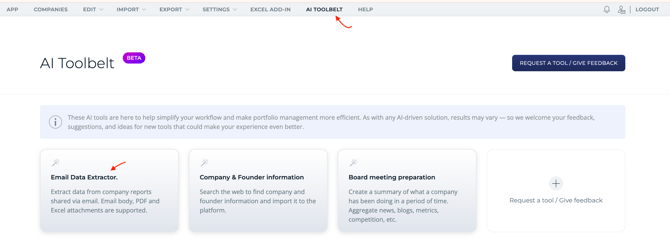
1\. Select the type of data you would like to extract from the email (company metrics and/ or company update). **Company metrics** are imported to company metrics table, and company update will be imported as a new qualitative **company report.**
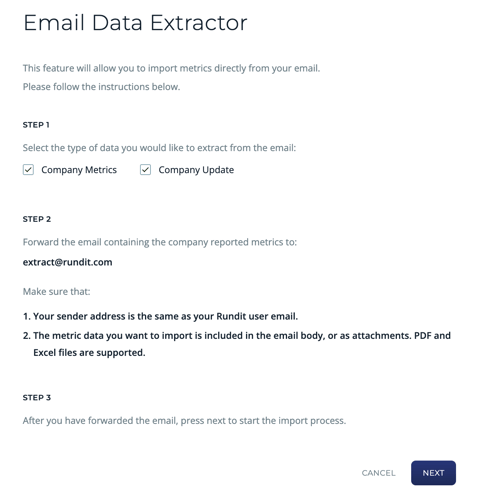
2\. Forward the email containing the company report to **extract@rundit.com.**
- Make sure that your sender address is the same as your Rundit user email.
- The data you want to import is included in the email body, or as attachments. PDF and Excel files are supported.
3\. After you have forwarded the email, press **Next** to start the import process.
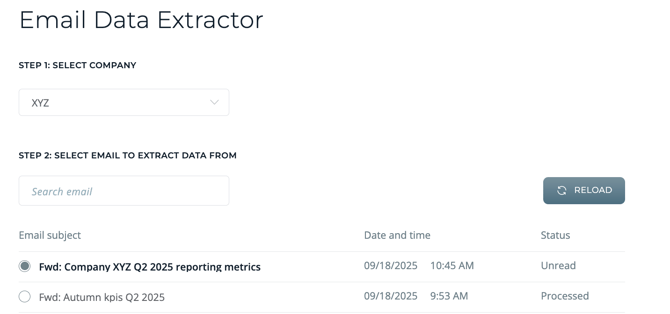
4\. Choose the company and view the list of emails available for import. You can search by email name if necessary. Select the email from which you want to extract data and click **Next.**
****
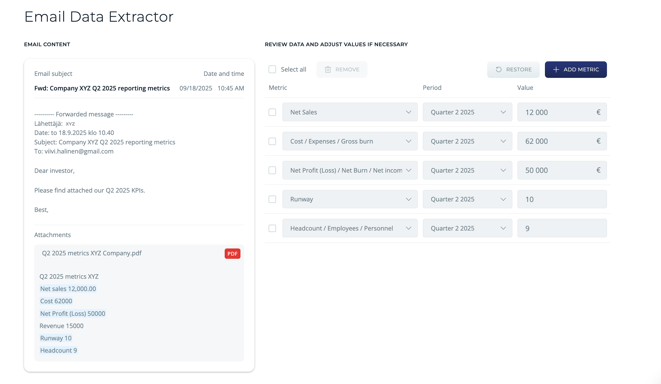
5\. Review the data and make any necessary adjustments.
- If you are importing data from attachments, you can open the attachment to check its contents.
- If there are metrics in the email that you want to import into Rundit but haven’t added those to your Rundit metrics template yet, you can create them immediately by clicking **Add metric.**
- Click **Next** to proceed to the final review.
****
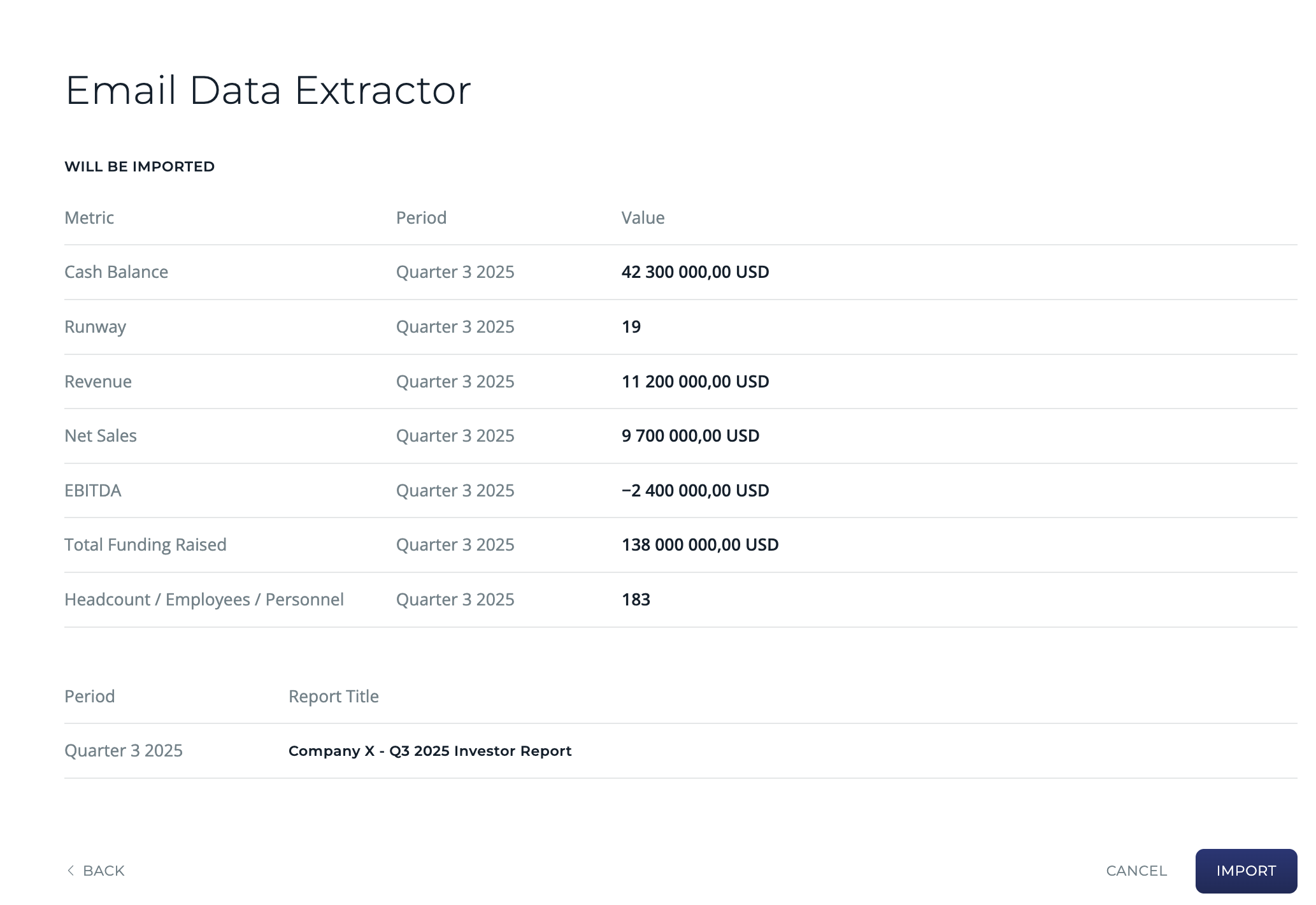
6\. Conduct a final review to confirm all data is accurate, then click Import. The selected metrics will be added to the company’s **metrics table**, and the management report will appear in the **company reports** section.
- [Rundit for Investors - Get started](https://support.rundit.com/rundit-for-investors-get-started?hsLang=en#main-content)
- [Investors](https://support.rundit.com/rundit-for-investors-get-started?hsLang=en#investors)
- [Account settings](https://support.rundit.com/account-settings?hsLang=en#main-content)
- [User Settings](https://support.rundit.com/account-settings?hsLang=en#user-settings)
- [Organization Settings](https://support.rundit.com/account-settings?hsLang=en#organization-settings)
- [Users & Funds](https://support.rundit.com/account-settings?hsLang=en#users-funds)
- [Currency Settings](https://support.rundit.com/account-settings?hsLang=en#currency-settings)
- [Subscriptions](https://support.rundit.com/account-settings?hsLang=en#subscriptions)
- [Security](https://support.rundit.com/account-settings?hsLang=en#security)
- [Functionalities](https://support.rundit.com/functionalities?hsLang=en#main-content)
- [Portfolio monitoring](https://support.rundit.com/functionalities?hsLang=en#portfolio-monitoring)
- [Investment data](https://support.rundit.com/functionalities?hsLang=en#investment-data)
- [Investments Overview Dashboards](https://support.rundit.com/functionalities?hsLang=en#investments-overview-dashboards)
- [Export data](https://support.rundit.com/functionalities?hsLang=en#export-data)
- [Company profile](https://support.rundit.com/functionalities?hsLang=en#company-profile)
- [Comments](https://support.rundit.com/functionalities?hsLang=en#comments)
- [Company reports](https://support.rundit.com/functionalities?hsLang=en#company-reports)
- [Portfolio activity](https://support.rundit.com/functionalities?hsLang=en#portfolio-activity)
- [Global fund and currency selector](https://support.rundit.com/functionalities?hsLang=en#global-fund-and-currency-selector)
- [Capital allocation](https://support.rundit.com/functionalities?hsLang=en#capital-allocation)
- [Company custom ID](https://support.rundit.com/functionalities?hsLang=en#company-custom-id)
- [Industry](https://support.rundit.com/functionalities?hsLang=en#industry)
- [Labels](https://support.rundit.com/functionalities?hsLang=en#labels)
- [Currency Settings](https://support.rundit.com/functionalities?hsLang=en#currency-settings)
- [Interactive Fund Report](https://support.rundit.com/functionalities?hsLang=en#interactive-fund-report)
- [Fund Management](https://support.rundit.com/functionalities?hsLang=en#fund-management)
- [AI Toolbelt](https://support.rundit.com/functionalities?hsLang=en#ai-toolbelt)
- [Dashboards](https://support.rundit.com/functionalities?hsLang=en#dashboards)
- [Rundit for Portfolio Companies - Get started](https://support.rundit.com/rundit-for-portfolio-companies-get-started?hsLang=en#main-content)
- [Investor reports](https://support.rundit.com/rundit-for-portfolio-companies-get-started?hsLang=en#investor-reports)
- [Getting started](https://support.rundit.com/rundit-for-portfolio-companies-get-started?hsLang=en#getting-started)
- [Investor groups](https://support.rundit.com/rundit-for-portfolio-companies-get-started?hsLang=en#investor-groups)
- [Metrics](https://support.rundit.com/rundit-for-portfolio-companies-get-started?hsLang=en#metrics)
- [File storage and sharing](https://support.rundit.com/rundit-for-portfolio-companies-get-started?hsLang=en#file-storage-and-sharing)
- [Troubleshooting](https://support.rundit.com/troubleshooting?hsLang=en#main-content)
- [Google Sheet integration](https://support.rundit.com/troubleshooting?hsLang=en#google-sheet-integration)
- [Email issues](https://support.rundit.com/troubleshooting?hsLang=en#email-issues)
- [Metrics](https://support.rundit.com/troubleshooting?hsLang=en#metrics)
- [Reporting reminder](https://support.rundit.com/troubleshooting?hsLang=en#reporting-reminder)
- [Navigation](https://support.rundit.com/troubleshooting?hsLang=en#navigation)
- [Interactive LP report](https://support.rundit.com/troubleshooting?hsLang=en#interactive-lp-report)
- [Investments](https://support.rundit.com/troubleshooting?hsLang=en#investments)
- [FAQs](https://support.rundit.com/faqs?hsLang=en#main-content)
- [Investors](https://support.rundit.com/faqs?hsLang=en#investors)
- [Portfolio Companies](https://support.rundit.com/faqs?hsLang=en#portfolio-companies)
- [AI Toolbelt & MCP](https://support.rundit.com/faqs?hsLang=en#ai-toolbelt-mcp)
- [Support Center Homepage](https://support.rundit.com/)
[](https://rundit.com/)
Support Center
Copyright © 2026, Rundit